

Zebpay is a crypto exchange that helps you buy and hold Bitcoins and other cryptocurrencies like Ethereum, Ripple, TUSD and Litecoin.
They have a simple trading platform and an app for the beginners to help them understand easily.
How Zebpay Works
Zebpay is a cryptocurrency exchange that you can have on your mobile device. You can also access Zebpay on the web using devices of your choice.
You need to create an account with Zebpay to buy/sell bitcoins and other cryptocurrencies. This means that you need to complete KYC by uploading documents and deposit money into your Zebpay account.
Zebpay allows you to deposit and withdraw rupees from the linked bank account.
Zebpay Features
#1. Deposit and Withdraw INR
You can deposit and withdraw Indian Rupees (INR) from your Zebpay account using net banking and UPI. The INR amount can be used for investing in cryptocurrency. Once you have Bitcoins, Ethereum or USDT, you can use them to buy other cryptocurrencies.
#2. Accessible Across Platforms
Zebpay trading happens through mobile apps and web applications.
Both the trading platforms can be accessed on any of the devices like laptop, tablet, smartphone and PC that has an internet connection.
#3. Fast Lightning Payments
Zebpay offers a new protocol free of charge that is built over Bitcoin and allows small amounts with faster payments by scanning or pasting invoices.
Presently, the system allows a maximum of 0.002BTC per transaction and up to 10 transactions per day.
You would like to read Comparison between Zebpay and WazirX
Zebpay Fee & Charges
#1. Zebpay Transaction Charges
Taker fees are trading charges that happen immediately after placing the order. Whereas, if you are required to wait for the order to get matched then you need to pay a Maker’s fees.
Zebpay has a different maker (0.15%) and taker (0.25%) fees. Orders near to market prices will get executed immediately and you need to pay the higher taker’s fees.
#2. Zebpay Deposit Charges
Zebpay charges for INR deposits are under –
- Rs. 10 per deposit transaction made using net banking
- Rs. 25 per deposit using UPI
- Rs. 7 for rupee deposited through bank transfer
All crypto coins deposited into your account are for free.
#3. Zebpay Bitcoin Transfer Charges
If you want to transfer Bitcoin to any other wallet then Zebpay treats it as a withdrawal transaction. Zebpay charges 0.0006 BTC as Bitcoin withdrawal fees.
#4. Zebpay Crypto Withdrawal Fee
Zebpay charges withdrawal fees when you move your cryptocurrency. The withdrawal fees vary from currency to currency and are subject to minimum and maximum amounts.
For example, if you wish to withdraw Bitcoin (BTC) then you need to pay;
| Particulars | Amount |
| Withdrawal fees for Bitcoin | 0.0006 BTC |
| Minimum Withdraw Amount | 0.0005 BTC |
| Maximum Withdraw Amount | 1.31 BTC |
| Minimum Deposit Amount | 0.000001 BTC |
Likewise, withdrawal fees for Tether USD is 1.5 USDT, and for Ether (ETH) 0.015 ETH.
#5. Zebpay INR Withdrawal Fees
Zebpay charges Rs. 10 as withdrawal fees when you withdraw INR from your account.
#6. Zebpay Intraday Charges
You can also trade intraday (buy/sell on the same day) on Zebpay. The intraday fees charged by Zebpay is 0.10%. The intraday for cryptocurrency starts from midnight.
#7. Zebpay Membership Fees
Zebpay charges membership fees of 0.0001 BTC or equivalent per month which comes to around Rs. 340 per month based on present BTC prices.
The membership fee is only for inactive accounts. Means Zebpay wants you to trade at least once a month or pay membership fees.
Zebpay Products Review
#1. Zebpay App Review
Zebpay app helps you trade in cryptocurrency using your smartphone. The Zebpay app is compatible with both iOS and Android devices.
You can access the Zebpay exchange platform directly from the app. Zebpay allows you to do money deposits from your bank account and trade in crypto pairs from the app itself.
However, there are negative reviews of delayed KYC updation on the app.
App Store Information
| Particulars | Google Play Store | Apps Apple Store |
| Ratings | 3.7 | 3.6 |
| Size | 12 MB | 143.9 MB |
| Compatibility | Android 5.0 and up | Requires iOS 10.0 or later. Compatible with iPhone |
#2. Zebpay Wallet Review
Zebpay Bitcoin wallet, attached to your account, helps you store almost 98% of the cryptos safely in the cold wallets. That means your coins are offline and secure.
But your crypto assets at Zebpay are held in a secured pool and not in individual wallets with a private key. Zebpay allows you to transfer your crypto coins to other exchanges or your own individual wallet.
Zebpay supports six cryptocurrencies storing and trading in several currency pairs.
Zebpay wallets are secured using HSM (hardware security). Zebpay also has proprietary security protocol Omnitrixx to protect all wallet related transactions.
Zebpay Withdrawal & Deposit Limit
Zebpay deposits money (rupees) instantly. But is slow in processing withdrawal requests. The withdrawals happen in 1-3 business days from the time you submit the money withdrawal request.
Zebpay Withdrawal Limit
Zebpay offers two types of withdrawal transaction limits, namely whitelisted and non-whitelisted. If you carry high-volume transactions on a daily basis then you can whitelist the crypto that you are using.
Whitelisting gives higher transaction limits on a more secure line. Details of whitelisted withdrawal limits are under
| Crypto | Per transaction | Daily | Per month |
| Bitcoin | Min 0.0005 BTC Max 2 BTC | 8 BTC | 40 BTC |
| Ether | Min 0.02 ETH Max 94 ETH | 188 ETH | 563 ETH |
| TUSD | Min 5 TUSD Max 42500 TUSD | 85000 TUSD | 425000 TUSD |
| Ripple | Min 25 XRP Max 125000XRP | 125000 XRP | 375000 XRP |
| Tether | Min 5 USDT Max 42500 USDT | 85000 USDT | 425000 USDT |
Zebpay Deposit Limit
| Crypto | Per transaction | Daily | Per month |
| Bitcoin | Min 0.000001 BTC Max 100 BTC | 300 | 300 |
| Ether | Min 0.02 ETH Max 1000 ETH | 3000 | 3000 |
| TUSD | Min 5 TUSD Max 1000000 TUSD | 200000000 | 2000000000 |
| Ripple | Min 25 XRP Max 1000000 XRP | 1000000 | 1000000 |
| Tether | Min 5 USDT Max 100000 USDT | 200000000 | 200000000 |
Cryptocurrency You Can Buy Through Zebpay
Zebpay supports very few coins and crypto trading pairs. The company is currently revamping its exchange and platform to regain the lost momentum post removal of the RBI ban.
Presently, Zebpay only supports frontline six cryptocurrencies like Bitcoin, Ethereum, Litecoin, Ripple, Bitcoin Cash and EOS.
The trading pairs are limited to around 15 trading (12 cryptos/fiat and 4 crypto-crypto pairs). We hope that the scene will change soon.
Zebpay Complete Guide
How to Open Zebpay Account
Step 1 – Click here to open Zebpay account

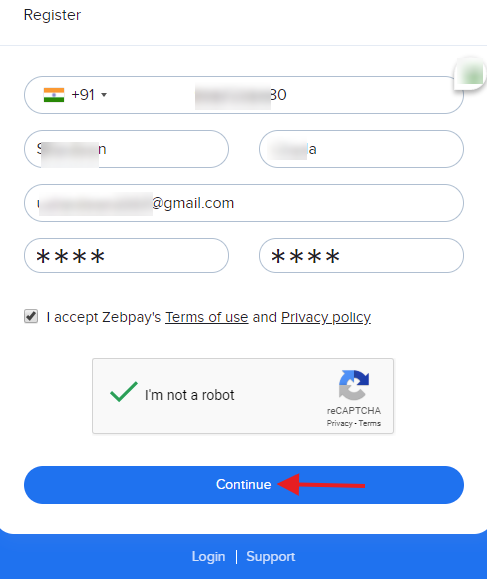
Step 2 – Register by providing you name, mobile number and email address
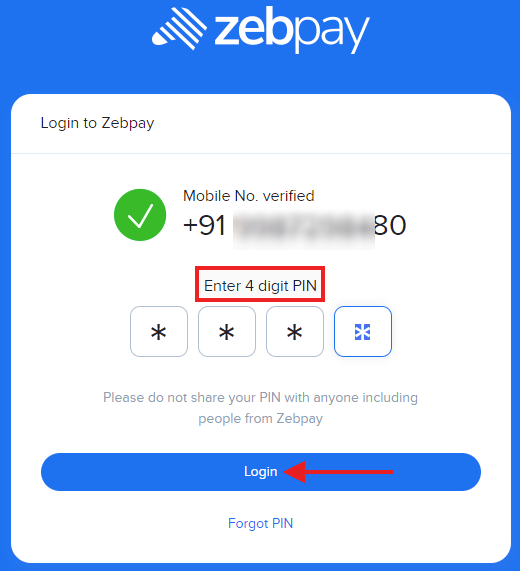
Step 3 – Verify mobile number using OTP and PIN
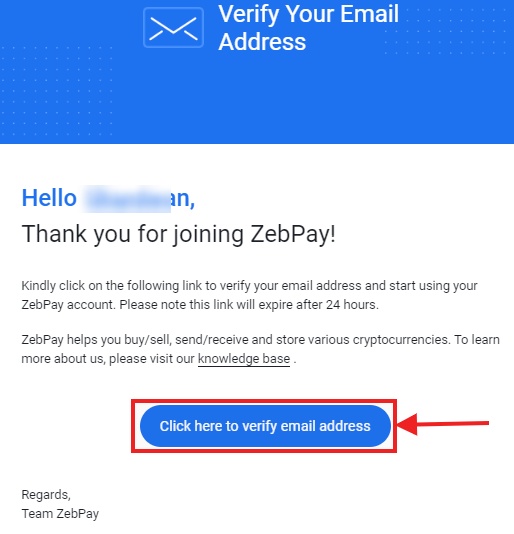
Step 4 – Verify email address by clicking the link
How to Add Money in Zebpay
You can add money (INR) in Zebpay using Mobikwik UPI. You need to click on the deposit tab and select Mobikwik to proceed further.
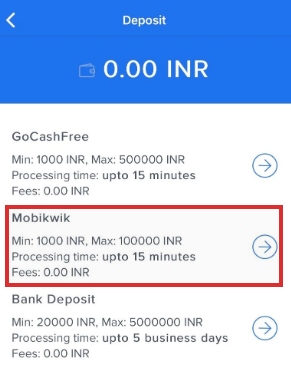
The other money deposit methods are through the GoCashFree app and through net banking.
Next, you need to add the amount that you wish to deposit and press the tab “Proceed to Deposit”.
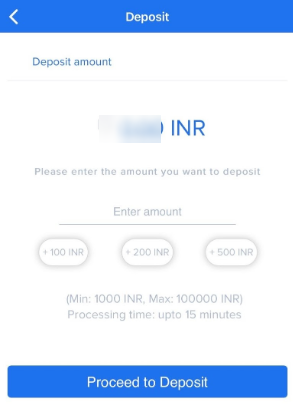
After that, you have two payment options to choose from as per your convenience – UPI or UPI QR.
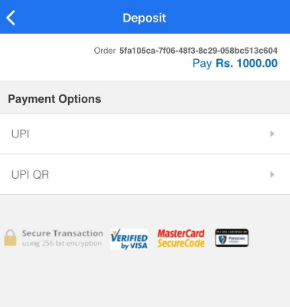
#1. Deposit through UPI
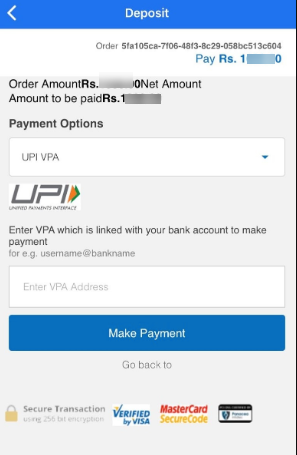
For making a money deposit through UPI, you need to add your UPI handle. You will receive a payment request on your UPI app.
Once you approve the transaction on your UPI app the money would be credited to your Zebpay account.
#2. Deposit through UPI QR
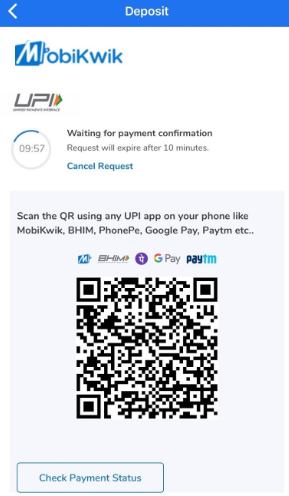
Scan the QR code displayed on the screen with your UPI app to deposit money. After confirmation, the money will get credited to your Zebpay account.
How to Receive & Buy Bitcoin in Zebpay
To receive a Bitcoin
On the app, you first need to select the cryptocurrency that you want to receive. You need to select the Bitcoin symbol to receive Bitcoins.
Click on the receive option and tap the (+) button on the bottom right-hand side to create a receiving address. You can label the receiving address. For sending the link you can scan the code or copy it and share it via email or message.
To buy Bitcoin
To buy Bitcoin you can log in to the Zebpay exchange and on the left-hand side, you have the order entry form.
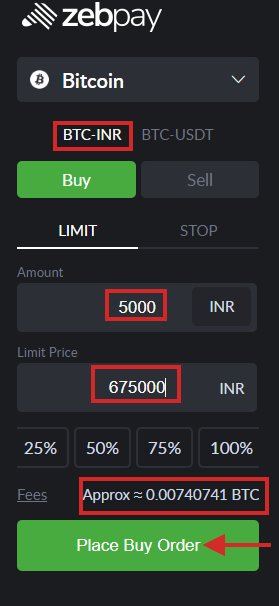
Click on BTC-INR to buy Bitcoin and fill in the amount and the limit price. For example, you want to buy Bitcoins for Rs. 5000 then you need to fill the amount as Rs. 5000.
The limit price is the price at which you want to buy bitcoins. Bitcoins are presently traded at Rs. 6,80,000 on the Zebpay exchange. You can place a limit order at Rs. 6,75,000 per Bitcoin.
For Rs. 5000 you will get approximately 0.00740741 BTC. Click on “Place buy order” and confirm the trade.
Once the order is traded, then you will receive the bitcoins in your account.
How to Send Bitcoins From Zebpay
To send the Bitcoin from Zebpay you need to have the receiver’s Bitcoin address. Make sure that it is a Bitcoin address only because Ethereum, Bitcoin, or any other coin will not accept Bitcoin on their address.
Once Bitcoins are lost then recovering them is very hard unless you have the seed words.
For sending Bitcoins from Zebpay, select the Bitcoin address from the address list and enter the quantity of Bitcoin that you want to send.
Click on the send option to initiate the transaction and enter the PIN to confirm the transaction.
How to Convert BTC to INR Zebpay
For converting BTC (Bitcoins) into INR you need to sell Bitcoins on the Zebpay exchange and receive the sale proceeds in INR in your Zebpay account.
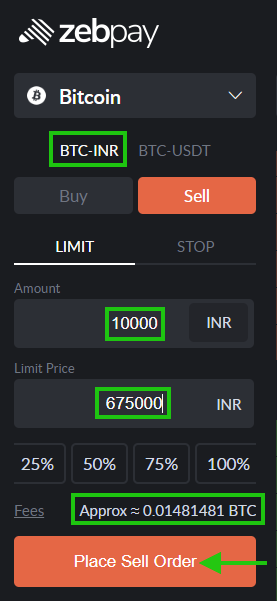
For selling Bitcoins you need to select BTC-INR and sell option. Enter the amount of Bitcoins that you want to sell and the BTC limit price at which you want to sell.
For example, you need to sell approximately 0.01481481 Bitcoins then you will get around Rs. 10,000 as sale proceeds.
You can transfer this amount into your linked bank account and use them.
How to Transfer Bitcoin From Zebpay to Koinex
The transfer of Bitcoins from Zebpay to Koinex is possible only when you have the Bitcoin address from Koinex. The Bitcoin address can be from your Koinex account or somebody else to whom you are sending the Bitcoins.
To get a Koinex Bitcoin address, you need to tap the deposit option of Bitcoin. Then you will get a pop-up with the address details in the form of QR code and in text form also.
Send this code to your Zebpay. The Bitcoin address list will get added to Zebpay.
To send Bitcoin from Zebpay, click on the send option and select the Koinex Bitcoin address and tap to proceed for the transfer. Enter your PIN numbers and confirm the transfer.
How to Buy Ripple in Zebpay
Select the Ripple crypto coin from the drop-down list and select Ripple.
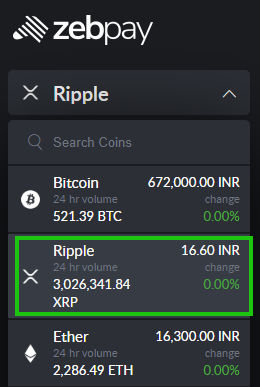
Enter the buy order form by indicating the amount and the limit price at which you want to buy Ripple. Ripple is presently traded at Rs. 16.70.
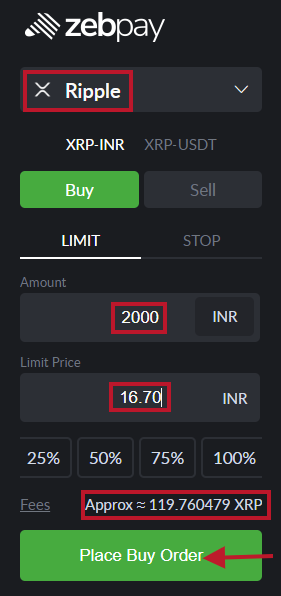
For example, you can set the limit price at Rs. 16.70 to buy Rs. 2000 worth of Ripple. You will get approximately 119.760479 Ripples for Rs. 2000.
How to Withdraw Bitcoin From Zebpay
To withdraw Bitcoins from Zebpay, you need the Bitcoin address to whom you want to give. Bitcoins do not have physical existence like paper rupee (fiat) that you can hold, touch and feel.
Select the bitcoin address from the address list and enter the quantity of Bitcoin that you want to send (withdraw).
Click on the send option to initiate the transaction and enter the PIN to confirm the transaction.
How to Withdraw Money From Zebpay
Zebpay allows money withdrawal anytime only to the linked bank account that is registered with Zebpay.
The withdrawal is subject to minimum and maximum limits, the information of which will be displayed on the bank page while withdrawing.
You need to select the “withdraw” icon on the dashboard and click the right arrow. Next, you need to fill the amount of money that you want to withdraw and click “Proceed to Withdraw”.
There will be a pop-up page with bank details to verify, check the details and enter the PIN to confirm the transaction.
The money will get credited into your bank account in 1-3 business days.
Zebpay Pros
- 0.15% maker fees
- Intraday trading in cryptos at 0.10% fees
- Simple Zebpay app & wallet facility
- Lightning-fast payments
Zebpay Cons
- Membership fees of 0.0001 BTC for inactive accounts
- Supports only 6 cryptocurrencies
- Trading pairs are limited to around 15 trading
Zebpay FAQ
What is Zebpay
Zebpay is a cryptocurrency exchange founded in 2014 where you can trade in digital coins like Bitcoins, Ethereum, Ripple and Litecoin.
You can get registered at Zebpay, complete KYC, deposit money and start crypto trading. Zebpay also offers crypto wallet services.
Is Zebpay Legal in India
Like many other Bitcoin exchanges, Zebpay closed its operations after the RBI ban in 2018. With the recent Supreme Court orders relaxing ban, now Zebpay is safe and legal in India.
Which Mobile Version is Supported by Zebpay
Zepay supports iOS versions 10 and Android 5 and above for their Zebpay app. Make sure that your OS is of the above versions mentioned.
Conclusion
Zebpay is totally safe and legal to deposit & withdraw Rupees and do bitcoin trading. Zebpay has been in the crypto exchange business since 2014 but had to close Indian operations following the ban imposed by the RBI.
Now, Zebpay is back and is revamping its operations which may take some time to run full-fledged operations.
Zebpay offers intraday trade in crypto coins at a lower 0.10% fee and simple to use app and trading platforms for you to get started.



Zebpay is run by thieves, who ask you to deposit money in m.acemax-coin com and steal whatever you have deposited.
Do not at any cost use this wallet
Don’t ever invest through zebpay, I have kept my crypto for 2 years they have taken all of it, I’m not getting any response from customer care. They are directly closing tickets after 6-7 days.
You can use the Zebpay Twitter handle to attract their attention at https://twitter.com/zebpaysupport
Remember to keep your cryptos in your crypto wallet rather than keeping them in the exchange account.
same happened with me.. they took away all the money and never ever responded on emails.. lets all of us join together and sue this shitty company
Hi,
On some sites, its mentioned that trading fees are 0% and on some sites there’s mention of trading fees (maker (0.15%) and taker (0.25%)).
Please share latest status.
Zebpay has operations in Australia, Singapore, and India.
You can check all the fee details for India on https://zebpay.com/in/fees/
I put money into my zebpay a/c through upi, An hour has passed away still money not credited into my zebpay a/c…what to do.plz suggest me.
Please contact their customer support
till credited or not ?
I have made a payment about 20000 rs it was deducted from my phone pe wallet bt not shows in jebpay wallet still today …
Please contact their customer support
Same happened to me..they stole all coins which bought from them back in 2017,
They don’t bother to respond on twitter .they are real scammers .
I don’t this is paid blog article by the author or not because I believe zebpay is stealing every one money by misusing the laws of crypto .they should be banned .
AxisOption is the best provider of an interest wallet system in 2021. They pay interests for every bitcoins you hold.
It is false that Zebpay does not charge while depositing INR. if we deposit via Net banking zebpay charge Rs 10, Via UPI charges Rs 25, and RS 7 via bank transfer.
Thanks for sharing the updated information. I am going to update the article
Zebpay are fraud.. Without our permission they sell our crypto in the name of membership fees. They have deducted my hard earned Rs 450 worth of 2,00,000 BTTC from my account even I am in loss without informing me… From my side I have requested them to refund but they denied as they are prioritising more to money greed than customer builing or services because their vision to do rug pull in future.. Guys beware of them rather invest in other growing exchange platform like Coin DCX or DEFY..
Zebpay is undoubtedly the worst crypto exchange. It is only flourishing in India because of their India centric payment withdraw options and that is it. Their UI is clunky, their prices are never aligned to what other exchanges are having at that moment, not even close. Whenever their is a spike in any currency they halt their trading and put a useless banner which is not even persistent for more than a second which makes it very hard to read unless you somehow managed to screenshot it. Their servers are worse than a potato pc and never responsive during peak hours and often does not populate either your balance or the coin’s current rate. The day it is legalized and Zerodha breaks into alt trading Zebpay will be a history. #ZPKMKB
Mera zebpay a/c hay lekin chalu nahi hota
contact their customer support.. if you don’t have funds in zebpay then you can open account with another company.
Please help me withdrawal my money zebpay
Steps to withdraw fiat money from Zebpay
– Click on withdraw option from the Homescreen
– Use the option “Bank Withdraw”
– Enter the amount that your wish to withdraw and click the “Proceed to Withdraw” button
– You will get a pop-up containing details of your registered bank account. Check and click OK
– Enter PIN to confirm the withdrawal
If you are still facing any issues, I would suggest you contact their support team.